 Typed & Kept
The page refreshed and wiped my form answers: what to try
When a page refreshes in the middle of a form, Chrome reloads it from the website and the text you typed is almost always gone, so check whether the site saved its own draft, and if you had a form-saving extension like Typed & Kept installed, click into the empty field and press Restore draft.
It happens most on long forms: a job application, a support ticket, a grant or a college essay box. On X in November, someone applying for a job wrote that the page refreshed and deleted all of their answers. Here is what a reload actually does to your text, what to check, and how to make sure the next one doesn't cost you an hour.
What a refresh does to the text you typed
Our test, November 26, 2026: Google Chrome 156 on Linux, a fresh profile, and three simple pages we served ourselves. On each page we typed into a text area and a text box, then pressed Back, Forward and Reload.
- Reload wiped every field, every time. On all three pages, after Reload the text area and the text box were empty.
- Back was different. On a plain form, following a link away and then pressing Back brought the text back. On a form that the page drew with a script a moment after loading, which is how many application portals work, the fields came back empty.
Chromium's own stability documentation says the same about a crashed tab: reloading typically brings the page back, "though any previously entered data is lost." A refresh asks the site for a fresh copy of the page, and a fresh copy has empty boxes.
What to try right now
- Don't type into the empty form yet. If an extension saved a draft, typing over the field replaces it.
- Look for the site's own draft. Many application sites save progress when you move between steps, or have a "Saved" or "My applications" area. Signed-in Google Forms can autosave your progress, for example. Sign in again and open the application from your account, not from the job post.
- Check your clipboard. If you copied a long answer at any point, paste it into a blank document before you copy anything else.
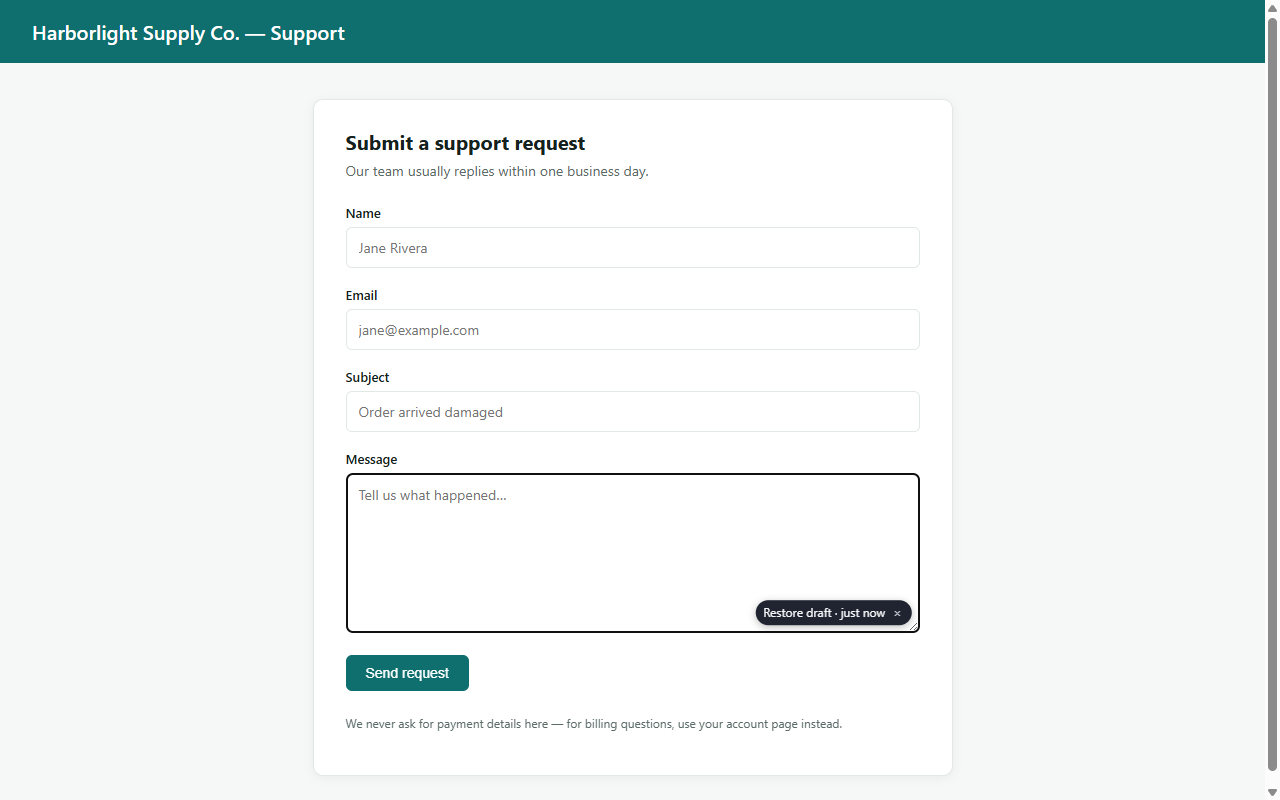
- If Typed & Kept was installed, click into the empty field and press the Restore draft badge (details below).
If none of those has your text, it's gone. Nothing in Chrome keeps form text after a reload, and an extension installed now can't recover what was typed before it.
How to stop it happening next time
- Write long answers somewhere that saves itself, such as a document, then paste them into the form. Slower, but nothing on the form page can lose them.
- Don't leave a half-finished application sitting in a tab for hours. Many sites sign you out after a period of inactivity, and the page reloads to the sign-in screen.
- Use the site's Save button between sections if it has one.
- Install a form-saving extension before the next long form.
Firsthand: what Typed & Kept 1.0.0 does after a refresh
Typed & Kept is a browser extension by Toolshed, version 1.0.0 on the Chrome Web Store, Firefox and Microsoft Edge. The behavior below was checked against the 1.0.0 extension code on November 26, 2026.
As you type into a text box, text area or editable field, Typed & Kept saves a copy about a second after you stop typing, and again when you switch tabs or the page starts to close. After a refresh:
- Click into the field that's now empty.
- A Restore draft badge appears in the field's corner, with how long ago you typed it (for example "Restore draft · 3 min ago").
- Click it. Your text goes back into the field.
No badge? Open the Typed & Kept toolbar popup, go to Drafts and press Restore next to the right one. The popup lists drafts from every site, and Restore fills the field on the page you have open. Drafts are tied to the page address and the field, so open the same page you were typing on. When you submit a form, Typed & Kept deletes that form's drafts two seconds later, so old answers don't pile up.
Free keeps drafts for 7 days. Pro, $9 once, lets you keep them for 7, 30, 90 or 365 days, or forever, and adds search. Drafts stay in chrome.storage.local on this computer; there is no Typed & Kept account or server. It is built to skip password fields, the username or email field of a sign-in form, card and bank numbers, government IDs and one-time codes, plus a built-in list of bank, payment, tax and health sites. It can only restore what it saved after you installed it.
Add Typed & Kept to Chrome, free
FAQ
Can I get my form answers back after the page refreshed?
Only if something saved them first: the website's own draft or progress save, your clipboard, or a form-saving extension that was already installed. In our Chrome 156 test, Reload emptied every field, and Chromium's documentation says entered data is lost when a crashed tab is reloaded.
Does pressing Back bring the text back after a refresh?
No. After a refresh you are on a new copy of the same page, so Back goes to the page before it. Back only helps when you left the form page by following a link, and even then it doesn't work on every form.
Why did the page refresh on its own?
Common reasons are a session that timed out and sent you back to sign in, a site update, or the browser reloading a tab it had paused to save memory. The cause varies by site, so save long answers as you go.
Will Typed & Kept save my answers on a job application site?
It saves text boxes, text areas and editable fields on most pages, including application forms. It is built to skip password fields, the username or email field of a sign-in form, payment and bank numbers, government IDs and one-time codes, and a built-in list of bank, payment, tax and health sites.
Where does Typed & Kept keep the drafts?
In chrome.storage.local on this computer. There is no account and no server. Free keeps drafts for 7 days; Pro, $9 once, can keep them longer.
Sources
- Chromium documentation: An Overview of All Things Stability/Crash in Chrome. After a tab crash, reloading typically brings the page back "though any previously entered data is lost."
- Google Docs Editors Help: Autosave your response progress on a Google Form. An example of a site that keeps its own draft.
- Typed & Kept on the Chrome Web Store, version 1.0.0, and the 1.0.0 extension code (Restore draft badge on an empty field, Drafts tab, drafts removed 2 seconds after a form is submitted, free 7-day retention), checked November 26, 2026.