 Typed & Kept
How to recover form data in Chrome after a crash or a closed tab
Chrome can bring the tab back after a crash or a closed window, but the text you had typed into a form is usually gone. Chromium's stability documentation says that after a browser crash or a tab crash, data previously entered into web pages is lost. If Typed & Kept was already installed, reopen the page and look for a Restore draft badge next to the empty field.
What Chrome restores, and what it does not
Chrome treats a whole-browser crash and a single-tab crash differently, but the outcome for form text is the same in both cases, according to Chromium's stability documentation (current as of May 2026):
- After a browser-process crash, the app disappears. When you open Chrome again, tabs are often restored automatically, "though any data previously entered into web pages is lost."
- After a renderer (tab) crash, you see the "Aw, Snap!" page. Reloading typically brings the page back, "though any previously entered data is lost."
So the URL can come back. The paragraph you were in the middle of writing usually does not, unless the website itself kept a draft.
If you just closed the tab
Chrome Help, Manage tabs in Chrome, says that if you accidentally close a tab or window, you can open it again with a keyboard shortcut:
- Windows and Linux: Ctrl+Shift+T
- Mac: Command+Shift+T
That reopens the tab or window. It does not say the form fields will still contain your text. Some sites keep their own drafts. A signed-in Google Form can autosave progress for 30 days, for example. A generic support form, checkout comment, or application page often does not. If you open the same URL from History instead of using the shortcut, you are more likely to get a fresh, empty form.
If the fields are already empty
If Chrome has already discarded the text, and the site did not keep a draft, there is usually nothing left to recover. A form-recovery extension can only offer back what it saved while it was installed. Installing one after the fact will not reconstruct a form that is already gone.
For a long application or a support letter you cannot afford to lose, write it in a document that saves itself, then paste the finished text into the form. That is the advice Google's Chromebook community has given when a form was closed and the answers were already gone.
Firsthand: what Typed & Kept 1.0.0 does
Typed & Kept is a browser extension by Toolshed. Version 1.0.0 has been on the Chrome Web Store since November 5, 2026. Version 1.0.0 is also on Firefox and Microsoft Edge. The behavior below was checked against the 1.0.0 extension code and the live store listing on November 22, 2026.
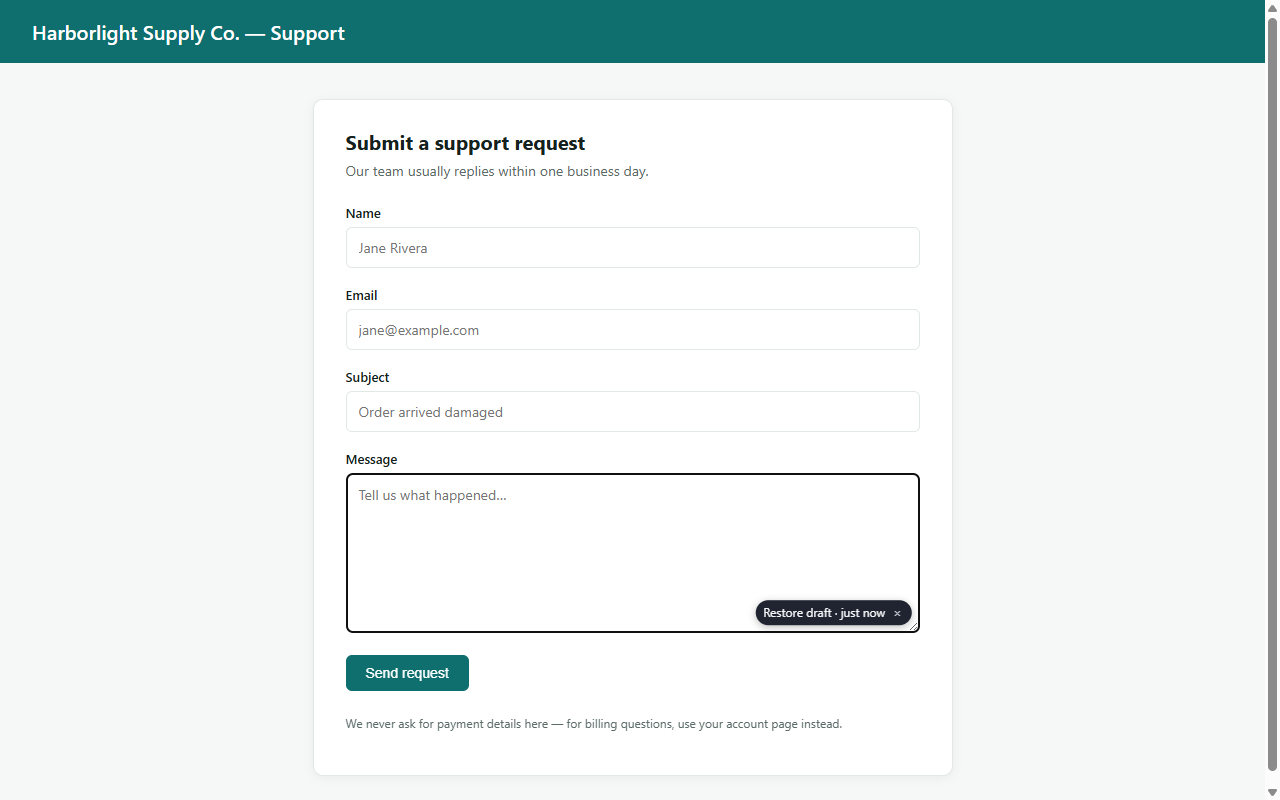
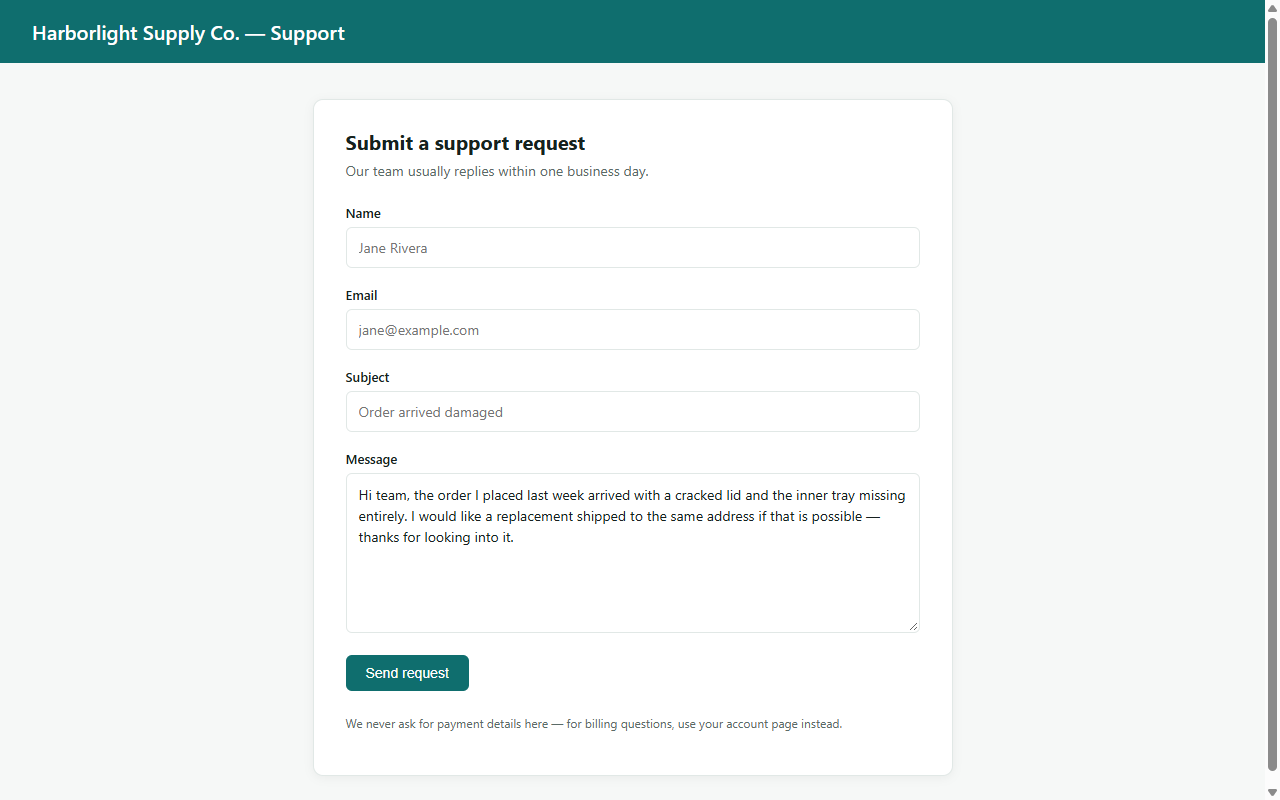
As you type into a text box, text area, or editable field, it keeps a local copy on this computer. If the tab closes, the browser crashes, or a session expires, reopen the page. A Restore draft badge appears next to the empty field. Click it, and the text comes back. You can also open the toolbar popup, go to Drafts, and press Restore.
On the free plan, drafts are kept for 7 days. There is no search. Pro, $9 once through Polar, can keep drafts longer (7, 30, 90, or 365 days, or forever), and adds search. It also keeps order-confirmation pages, which is a separate feature from form recovery. Drafts and receipts stay in chrome.storage.local on this computer. Password fields, payment numbers, bank details, government IDs, and one-time codes are not saved. See the privacy policy for the full list.
Typed & Kept cannot restore text you typed before you installed it. Install it, then keep typing as you normally would. There is nothing to turn on.
Add Typed & Kept to Chrome, free
FAQ
Does Chrome restore the text I typed after a crash?
Usually no. Chromium's stability documentation says that after a browser crash, tabs are often restored, but data previously entered into web pages is lost. After a single tab crash (the Aw, Snap page), reloading typically brings the page back, and the entered data is lost there too.
Will Ctrl+Shift+T bring back what I typed?
Chrome Help documents Ctrl+Shift+T on Windows and Linux, and Command+Shift+T on a Mac, as the way to reopen a tab or window you just closed. That returns you to the page. It does not say the form fields will still hold your text. If the site itself kept a draft, that draft may still be there. Otherwise the fields are often empty.
Can I recover a form I already lost if I did not have an extension installed?
If Chrome has already discarded the text, and the website did not keep its own draft, there is usually nothing left to recover. Typed & Kept can only restore drafts it saved after it was installed. Install it before the next long form, not after the text is already gone.
What does Typed & Kept restore, and where is it stored?
It autosaves text you type into inputs, text areas, and editable fields, then offers a Restore draft badge when you return to an empty field. You can also restore from the Drafts tab in the toolbar popup. The copy lives in chrome.storage.local on this computer. Free drafts are kept for 7 days. It does not save passwords, payment numbers, bank details, government IDs, or one-time codes.
Does Typed & Kept save passwords or payment fields?
No. It is built to skip password fields, the username or email field of a sign-in form, card numbers, CVV or CVC, bank account and routing numbers, IBAN or SWIFT, Social Security numbers, tax IDs, passport and driver's license numbers, PINs, and one-time or two-factor codes. It also skips a built-in list of bank, brokerage, payment, tax, and password-manager sites.
Sources
- Chromium documentation: An Overview of All Things Stability/Crash in Chrome (current as of May 2026). Browser-process and renderer-process crashes both state that data previously entered into web pages is lost.
- Google Chrome Help: Manage tabs in Chrome (Computer). Ctrl+Shift+T or Command+Shift+T reopens a tab or window you just closed.
- Google Docs Editors Help: Autosave your response progress on a Google Form. Site-level drafts, not a Chrome form-recovery feature.
- Google Chromebook Community: Can I recover data from a closed form? (March 2023). Community advice that answers on a generic form are often already gone, and that writing in an autosaving document first is safer.
- Typed & Kept on the Chrome Web Store, version 1.0.0, checked November 22, 2026; also on Firefox and Microsoft Edge, and the 1.0.0 extension code (autosave, Restore draft badge, free 7-day draft retention).
Related
- How long to keep form drafts, and what the free plan allows
- What a form autosave extension should never save (we tested ours)
- Typed & Kept home
- The page refreshed and wiped my form answers: what to try
- Chrome took you Back and the form is empty: what to try
- How to save order confirmation pages in Chrome
- How to delete saved form drafts and Autofill entries in Chrome
- Typio Form Recovery alternatives after the Chrome Web Store removal
- Privacy policy
- All guides